
What happens when a critical macro stops working?
If your Excel macro has suddenly stopped working, you’re not alone. Businesses often depend on complex spreadsheets and VBA automation, and when something breaks, it can bring critical workflows to a halt. It’s not unusual to discover that the person who wrote the macro has moved on — for example, in one situation I worked on, the original developer retired and his replacement was injured and wouldn’t be returning to the office for several weeks. In that case, I was able to fix the system in under a day, preventing a week’s disruption to reporting.
Fix Excel Macro Errors FAST — Solutions That Get Your Workflow Running Again. Think of me as the guy who will Fix Excel Macro Errors now. I help businesses quickly diagnose and repair Excel macros, resolve VBA errors, and restore automated spreadsheet systems.
Common Excel Macro Problems
- Excel runtime error 1004 A common error when a macro references an object that doesn’t exist or isn’t accessible.
- Macros that stopped working after an Office update Changes to references Libraries
- Broken references or missing libraries
- Macros that run extremely slowly
- Security settings blocking VBA macros
- Automation that fails when files are moved Or the file was renamed
- Spreadsheet Bloat formatting applied to cells not in use etc.,
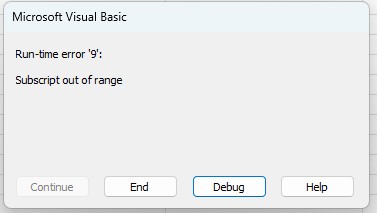
Typical Excel Macro Error
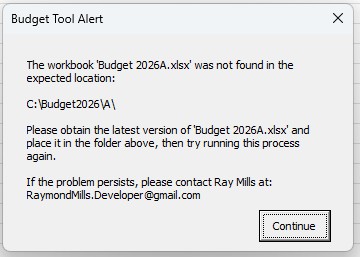
Here’s a more robust and user-friendly message. I added a couple lines of code for an error I thought users might make. They moved or changed the name of the file. Smart error management/avoidance makes for happy users.
Why Spreadsheets Stop Working
Office updates: Updates to Excel can change default settings or VBA references, causing macros that previously worked to fail or produce errors. Every new version of Excel brings in both large changes like file extensions like ".xls" is Now ".xlsx" and more subtle ones that can cause macros to stop running.
File path changes: If a macro references files in specific folders and those paths change, the macro can no longer locate the files and will stop running.
Workbook structure changes: Adding, removing, or renaming sheets or ranges can break macros that rely on those exact references. Users may be told “don’t change the worksheet,” but sadly they often still do. Protecting sheets from being changed is an art form.
Security settings: Excel may block macros from running if macro security settings are set too high, or if the file comes from an untrusted location.
Input Changes I recently worked for a client who had a what i call an unsophisticated macro that read in customer speadsheets. It could not react to the slightest of changes. I rewrote it toa djust to and learn from customer formatting changes.
Spreadsheet Bloat Workbooks have a habit of growing in complexity and size over time. I had a customer come to me with a critical workbook that had slowed to a crawl. It had millions of unnecessarily formated cells.
My Excel Macro Repair Process
- First, I review the spreadsheet and VBA code.
- I add annotation if missing (almost always the case).
- I identify runtime errors or broken references.
- I debug and repair the macro logic.
- I test the automation thoroughly.
- Finally, I provide a stable and reliable solution.
Types of Excel Automation I Repair
- reporting automation
- data imports
- dashboard updates
- financial models
- workflow automation
Why Work With an Excel VBA Specialist
Working with an experienced Excel VBA specialist ensures your spreadsheets are reliable, efficient, and fully optimized for your business needs. I help businesses automate repetitive tasks, fix broken macros, and build custom Excel tools that save time and reduce errors.
Unlike generic Excel help, a VBA specialist understands complex automation, debugging techniques, and the nuances of different Excel versions. Whether it’s repairing a critical macro that stopped working or designing a fully automated reporting system, you get expert solutions that work the first time.
With my services, you gain:
- Expertise in VBA: I have years of experience writing, debugging, and optimizing complex macros for businesses of all sizes.
- Reliable automation: I ensure your macros run consistently, even after Excel updates or file changes.
- Time savings: Automating repetitive tasks frees your team to focus on higher-value work.
- Problem-solving skills: I quickly identify the root cause of broken macros and fix them efficiently.
Learn More About Excel Macros
For more information about common Excel macro errors and how VBA works, you can refer to Microsoft’s official guide:
Related Excel VBA Services
Need Help Fixing an Excel Macro?
If your Excel automation has stopped working or is producing errors, I can help diagnose the issue and restore the system quickly.
Contact me today to discuss your Excel macro repair project.
[RayMills.Developer@gmail.com]🌐 [484 574 3190] 8AM – 5 PM EST (Please).
References are available upon request.